
We tested our converter on 8 real bank statement PDFs
Every converter says it is "accurate". We ran ours on real bank layouts, wrote down what broke, fixed it, and kept the files as a permanent test. Here are the numbers.
Why we ran this test
Until November 2026 our PDF parser was tested on statements we generated ourselves. That is a trap: your own test files always look like what your code expects. Column order, date style, how amounts are written, where the totals sit — you design all of it, so of course the parser handles it.
Real banks do not coordinate with you. So we collected 8 public sample statements that banks and document vendors publish — Chase business checking, Wells Fargo business checking, Santander UK, a UK Visa card, two Ent Credit Union cards, LGE Community Credit Union and Five Star Bank — and counted every transaction row by hand. For each file we wrote down the expected row count, the signed total of all rows, a handful of individual rows to spot-check (date and amount), and whether the statement's own numbers are consistent enough to verify a balance at all.
These are specimen statements with sample data, not anyone's private account. They are the same layouts real customers download, which is what matters for a parser.
How we measured
A result only counts as correct if all of these hold:
- Row count matches the hand count exactly — no dropped transactions, no summary lines counted as transactions.
- Signed net total (money in minus money out) matches to the cent. This catches reversed signs, which a row count alone never would.
- Spot rows — 3 to 5 chosen transactions per file — appear with the right date and the right signed amount.
- Balance status is honest. Where the statement is internally consistent, the converter must report that it ties. Where it is not, the converter must not claim it ties.
The test reads each PDF with the same engine the website uses in your browser (pdf.js), so what passes here is what you get on the page.
Before the fixes: 1 of 8 verified
Only one statement — Five Star Bank — came out fully right and balance-checked. The failures were the kind that matter most, because some of them looked fine at first glance:
- Wells Fargo: all 86 rows found — and every sign reversed. The bank prints the Deposits/Credits column before Withdrawals/Debits; the parser assumed the left money column was always money out. The row count was perfect, the dates were perfect, the descriptions were perfect. Only the arithmetic gave it away.
- Chase: the PDF stores amounts in fragments (
$15and,120.00as separate pieces of text), so the transaction amounts were never recognised. The parser then found the one table where numbers did look whole — the daily ending balance table — and read that instead. - Santander UK and the UK Visa card: dates like
18th Januaryand18 Jul 07were not recognised as dates, so the parser found zero rows. - Worst of all: when no balance check could run, the result still said "balance OK". A check that never ran was reported as a check that passed.
That last one is the failure we are least proud of. The other bugs produced wrong output; this one told you the wrong output was fine.
What a failure looks like on a real page
Here is page 2 of the Wells Fargo sample, as published. Note the column order: credits first, then debits, then an ending daily balance that only appears on the last row of each day.
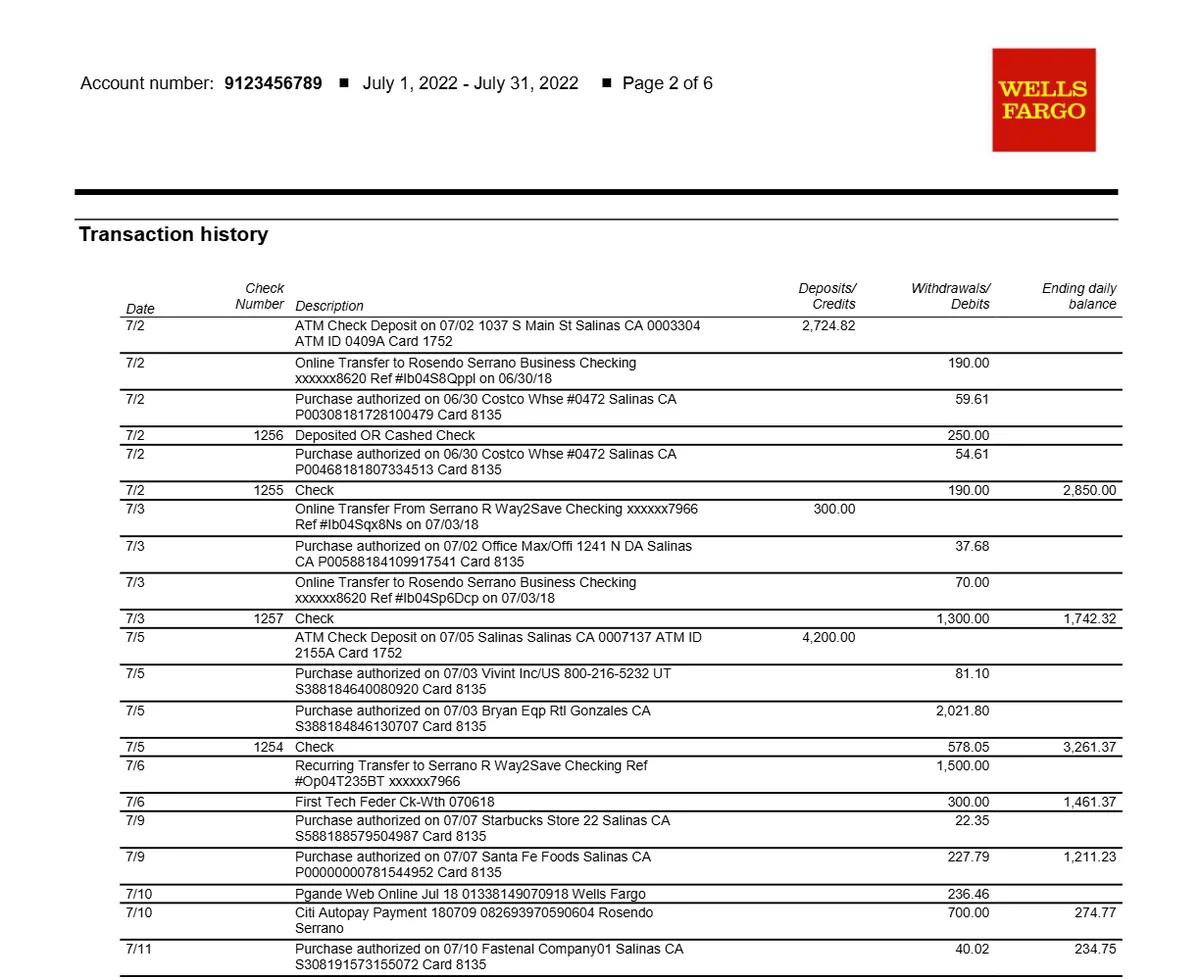
Before the fix, the 2,724.82 ATM deposit on 7/2 came out as −2,724.82 and the 190.00 transfer as +190.00 — and so on for all 86 rows. In a spreadsheet that looks completely normal. You would only notice when your books were off by roughly twice the month's activity.
And here is the same file in the converter today, unedited:
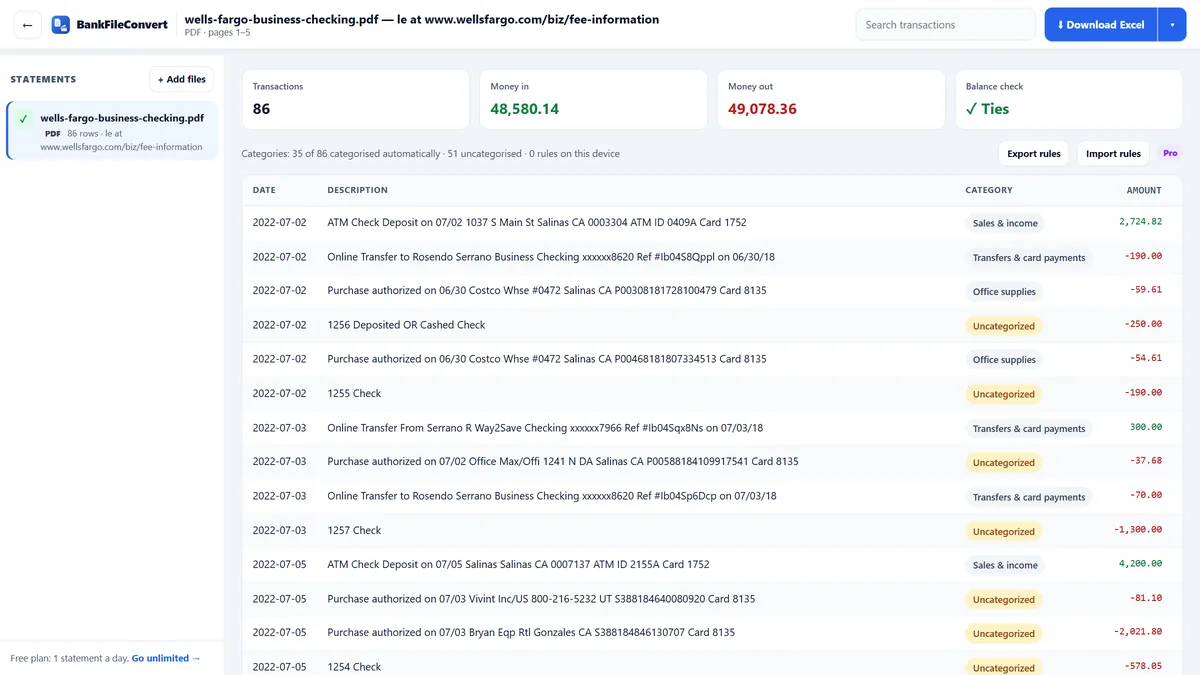
Money in 48,580.14 minus money out 49,078.36 is −498.22 — exactly the move from the statement's beginning balance of $869.40 to its ending balance of $371.18. That is what "Ties" means.
What we changed
- Text fragments that touch on the page are joined before amounts and dates are read, so
$15+,120.00becomes$15,120.00. - Money columns are named from their headings (Credits, Debits, Money in, Money out, Balance), not from their position.
- Signs are confirmed against the running balance: if a run of rows only adds up with the signs flipped, they are flipped.
- Daily ending balances, check summaries and "Total" lines are no longer mistaken for transactions.
- Ordinal dates, two-digit years and year-less dates (the year comes from the statement period) are understood.
- If no balance check could run, the result now says "Not verified" — never "OK".
Results, statement by statement
"After" is today's parser. "Rows" and "signed total" are compared with the hand count; "balance" is what the converter reports.
| Sample statement | Before | After: rows | After: signed total | After: balance check |
|---|---|---|---|---|
| Five Star Bank (US checking) | Correct, balance verified | 22 / 22 | −648.07 ✓ | Verified |
| LGE Community Credit Union (US checking) | Not correct | 7 / 7 | +2,279.26 ✓ | Verified |
| Wells Fargo (US business checking) | 86 rows, every sign reversed | 86 / 86 | −498.22 ✓ | Verified |
| Ent Credit Union Visa (US card) | Not correct | 6 / 6 | +4,755.64 ✓ | Verified |
| JPMorgan Chase (US business checking) | Amounts missed; daily-balance table read instead | 16 / 16 | +105,688.91 ✓ | Not verified — the sample's summary box is off by $2,000.00 against its own section totals |
| Ent Credit Union business card (US) | Not correct | 7 / 7 | −540.88 ✓ | Not verified — the page prints two example statements that share one summary box |
| UK Visa card (PayPlan specimen) | 0 rows (date format) | 2 / 2 | −122.78 ✓ | Not verified — the previous balance is printed without pence ("4,925") |
| Santander UK (two specimen statements) | 0 rows (date format) | 34 / 34 | +90,402.01 ✓ | Not verified — statement 1's printed running balance does not add up on 3 rows; statement 2 ties |
Total: before, 1 of 8 correct; after, 8 of 8 with the right rows and signed totals, 4 of 8 balance-verified.
Why 4 of 8 cannot be verified — and why that is fine
It would be easy to make every statement show a green tick. We could compute the closing balance from our own rows and compare it with itself. That is exactly the kind of check that always passes, and it is worthless.
A real check compares what we extracted with what the bank printed: opening balance plus every row must equal the closing balance, and where the statement prints a running balance, each row must move it by exactly its amount. On the four remaining samples, the bank's own numbers do not allow that. We checked each one by hand:
- Chase: our rows match the printed section totals for deposits, checks and withdrawals to the cent. The summary box at the top is what disagrees — by exactly $2,000.00. A sample document with edited numbers, most likely.
- Ent business card: it is an annotated "how to read your statement" guide that shows a control account and a sub-account on one page, with a single summary. No single opening balance applies to all rows.
- UK Visa card: the previous balance is printed as
4,925, with no pence, so the cents cannot be reconciled. - Santander statement 1: the printed running balance goes from 1,697.22 to 1,462.22 after a 115.00 payment. The bank's own arithmetic is off on three rows. Statement 2 in the same file ties perfectly.
On those files the converter now says so, instead of pretending. That warning is the point. A converter that is wrong quietly costs you an afternoon of reconciliation; one that says "this statement does not tie — look at these rows" costs you a minute.
Why balance checks matter more than "accuracy" claims
Most PDF statement errors are not missing rows. They are rows that are present but wrong: a reversed sign, a balance read as an amount, a summary line counted as a purchase, a transaction split across two lines. They look right in a table. A person scanning 86 rows will not see them.
Arithmetic sees them instantly. A bank statement is a closed system: the opening balance, every transaction and the closing balance must agree. If one sign is flipped, the total moves by twice that amount and the check fails. If a balance is read as a transaction, the total jumps and the check fails. That is why we built the converter around the check, and why it matters so much that the check never claims to have run when it did not. More on that approach on the balance-checked converter page.
What this test does not prove
Eight layouts is not every bank. Scanned statements go through OCR (tesseract.js, also in your browser), which is less reliable than a text PDF, and none of these samples were scans. Your bank may print something we have never seen. The balance check is the safety net for exactly that: if it says "Ties", the rows add up to the bank's own numbers; if it says "Not verified" or shows a difference, check before you import.
What happens now
The 8 files now run before every release, alongside our other automated checks; a release is blocked if any of them regresses. If your bank's layout breaks, tell us — redacted layouts become new tests. If you want to understand the whole process of getting a statement into a spreadsheet, see how to convert a bank statement to Excel.
Try it on your own statement → It runs in your browser; the file is never uploaded.