
Credit Card Statement to Excel
Drop your credit card statement — PDF, scan or screenshot — and get Excel, CSV or a QuickBooks file with every purchase, payment and fee signed correctly. The statement total is checked, and nothing is uploaded.
How it works — a real example
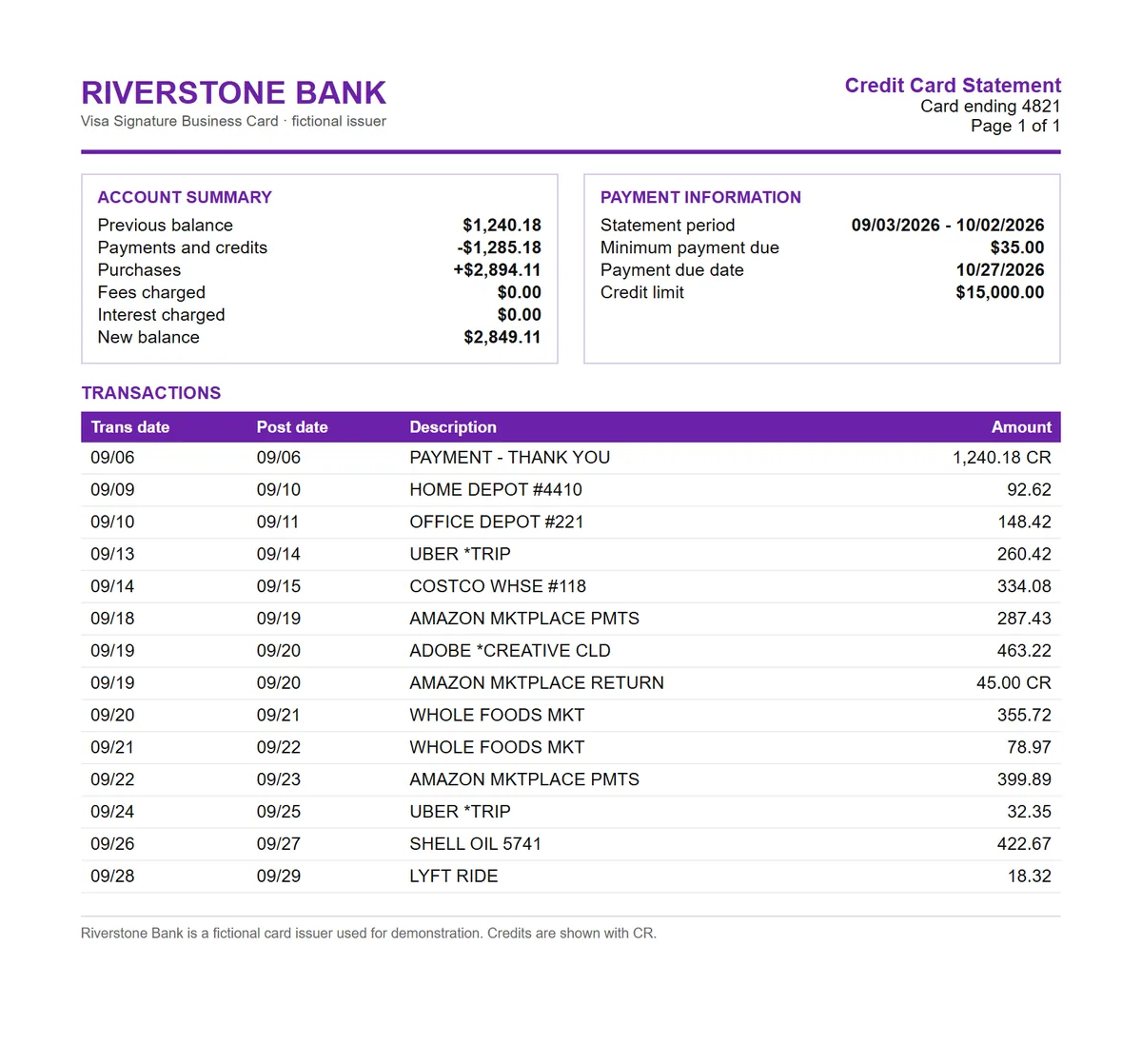
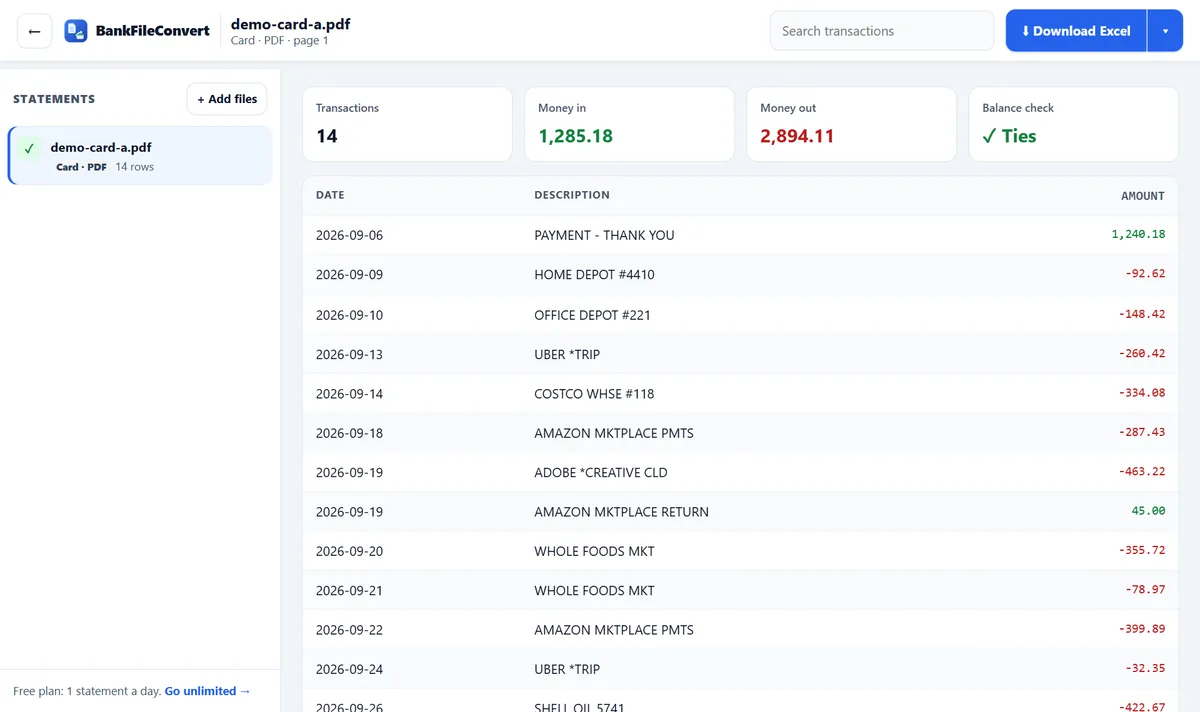
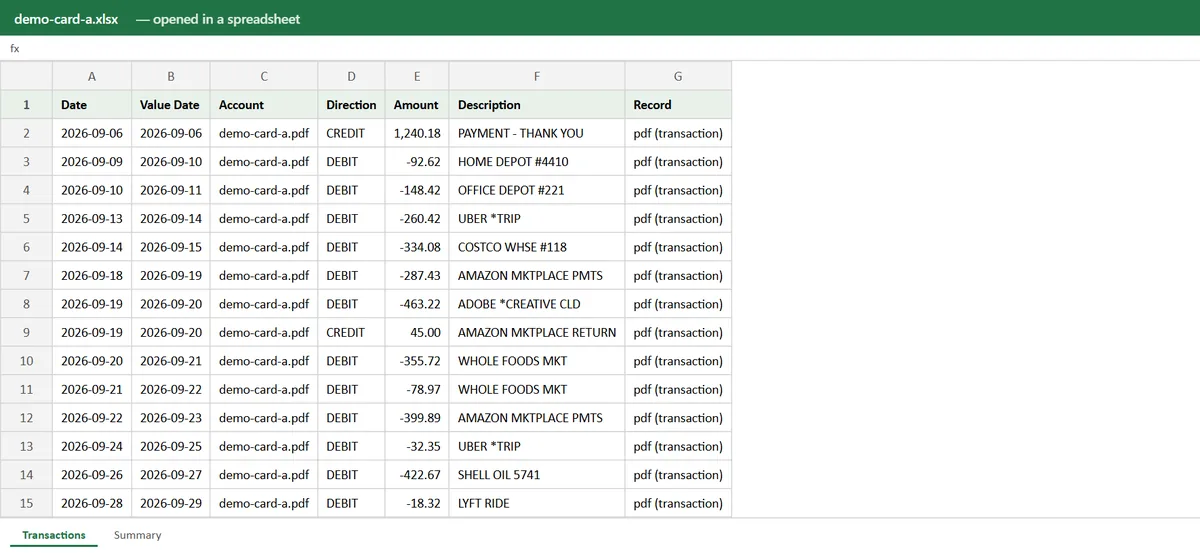
The card issuer in step 1 is fictional; steps 2 and 3 are this tool's real, unedited output for that PDF.
Why card statements trip up converters
A credit card statement looks like a bank statement but follows different rules. Purchases are printed as
positive numbers and payments as negative or marked CR; there is usually no running balance; dates
often have no year; and the activity is split into sections — payments and credits, purchases, fees, interest —
each with its own column titles. A generic PDF-to-Excel tool copies those numbers as they are, so your
spreadsheet ends up with purchases as income and section headings glued onto merchant names.
What this converter does differently
- Recognises the statement as a card statement from its header (card ending, credit limit, minimum payment, new balance) and applies card rules automatically.
- Signs every row from your side: purchases, fees and interest are money out; payments,
refunds and credits are money in — whether the issuer prints
CR, a minus sign or separate sections. - Checks the statement total instead of a running balance: previous balance plus the activity must equal the new balance, so a missed line shows up immediately.
- Keeps both dates and fills in the year for year-less dates from the statement period.
- Splits a year of statements exported as one PDF into one statement per period, each checked on its own.
Frequently asked questions
Which credit card statements work?
Text-based PDF statements from Visa, Mastercard, American Express and Discover issuers, including business cards. Scanned or photographed statements are read with on-device OCR. Layouts with one Amount column (credits marked CR or with a minus sign) and layouts split into Payments, Purchases and Fees sections are both supported.
Why are purchases negative in the Excel file?
On the statement a purchase increases what you owe, so it is printed as a positive number. In the spreadsheet every row is written from your point of view: a purchase is money out (negative), a payment or refund is money in (positive). That is the convention QuickBooks, Xero and most accounting tools expect for a credit card account.
How do I know nothing was missed?
Card statements rarely print a running balance, so the tool checks the totals instead: previous balance, minus payments and credits, plus purchases, fees and interest, must equal the new balance on the statement. If it doesn't, you see the difference before you import anything.
Does it keep both the transaction date and the posting date?
Yes. When the statement prints both, the transaction date goes in the Date column and the posting date in the Value Date column. Statements that print dates without a year (for example 09/06) get the year from the statement period, including December charges on a January statement.
Can I import the result into QuickBooks?
Yes. Download the .qbo file for QuickBooks Online, the .iif file for QuickBooks Desktop, or OFX for Quicken, Xero and Wave. Pick a credit card account type in Export settings so QuickBooks books purchases as charges.